


Build Hollyhill
ReadingBuild the four worlds
Open Hollyhill: press Map Settings  under the map, click Hollyhill in the grid, and press ×
 . Hollyhill is where the hero starts, so make it feel like home.
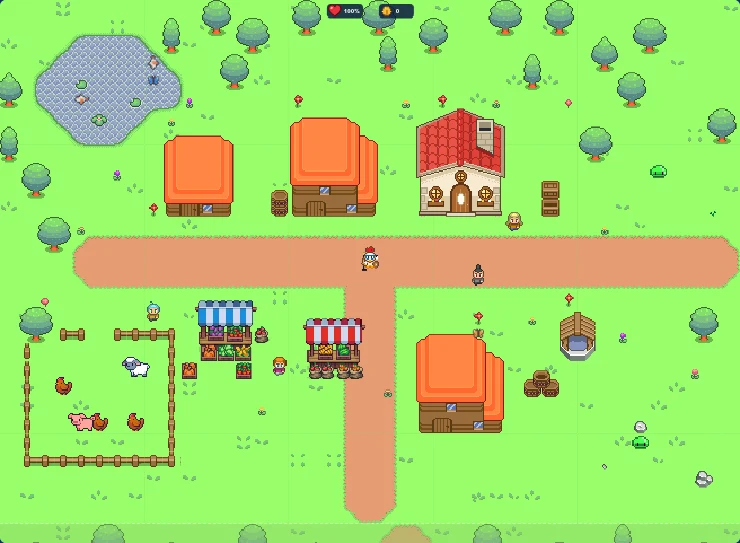
Lay the land first
Open the Terrain drawer  and pick Walkway. In the Brush drawer, pick Brick walkway. Then drag across the map to draw a road through the world, with a branch going south. Roads show the player where to go, and they lead to the next world.
Pick Water and paint a pond in a corner. Then, still in the Water brush, pick Lily pad and Koi and click them onto the pond.
Line the edges of the world with Tree and Bush, so it feels closed in and cosy. The Tree brush has several shapes to pick from, so mix them up.
Then fill it with life
Open the Objects drawer  . Put a few House brushes along the road, and a Shop market stall or two.
The Village decoration brush has wells, barrels, crates and flowers, so sprinkle them about. Draw a Fence in a square and put a few Animal chickens inside to make a farm.
Add some villagers with the Villager brush. When you put one down, its Object settings open on the left: type something for it to say in What they say.
A slime or two from the Enemy brush near the edges keeps the hero on their toes.
Mayor Rosa
One villager is special: Mayor Rosa. Put her by the big house. In her Object settings, type Rosa in the ID box at the top. We'll give her a script in chapter 3.
Your game
Here is your quest game. Press Expand, at the top right, to give it more room.