


Your coin in a game
ReadingMake it move, and use it
Your coin is ready. Now put it in a game, and play it!
Make a game
This section has a game builder right here on the page. It makes a new Platformer in your Lab, just for this course.
- Press Open your game here, in the box below.
- Answer the questions: pick Platformer, then any biome, any hero and any name.
- Press Create game.
Put your coin in
- On the row of buttons down the left of the builder, press Sprites
 . The Sprites drawer slides open. It holds the things you made in the Addon Lab.
- Press Coin. Which coin? opens, with your coins.
- Pick your coin. The Coin card gets a tick.
- Click on the map, in the air above the ground. Your coin appears! Click again a few times, to make a row of coins.
The coin counter at the top of the map goes up: 0 / 5 means 5 coins to collect. And look: your coins spin!
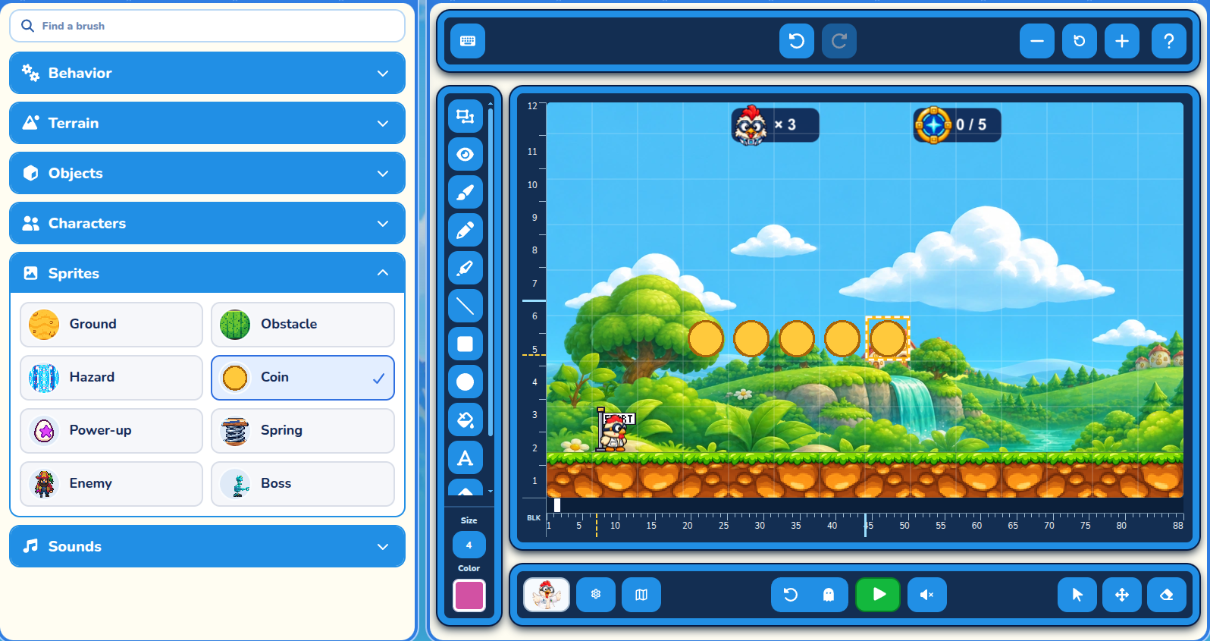
Now press Play  , under the map. Run and jump, and collect your coins.
Your coin's settings
Back in the Addon Lab, the buttons at the top work on your whole coin.
| Button | What it does |
|---|---|
Settings  | Change your coin's name. Type it, then press Save. |
Export  | Save your coin to your computer. A coin with frames comes out as one strip: its frames side by side. 2 times bigger and 4 times bigger make each pixel a sharp block, for showing people. Press Download. |
Share  | Make your coin public, so other players can use it too. Ask a grown-up first. Your coin is checked before anyone else can see it. |
More poses
Your coin has one row of frames, called Pose 1. A sprite can have more rows, called poses. A hero has poses for walking each way, and one for when it is beaten. The game plays those by itself.
You can add poses of your own, with Add a pose under the rows. A script tells the game when to show each one, by its name. Scripts are written in Splat Script. To learn it, take the course Splat Script: Code Your Own Game.