

Frames
ReadingMake it move, and use it
A spinning coin is a few pictures, played one after another, very fast. Each picture is a frame. In this section you give your coin four frames, so it spins.
Watch a coin spin
This is a coin from the Platformer's Green Hills. Press Play to watch it spin.


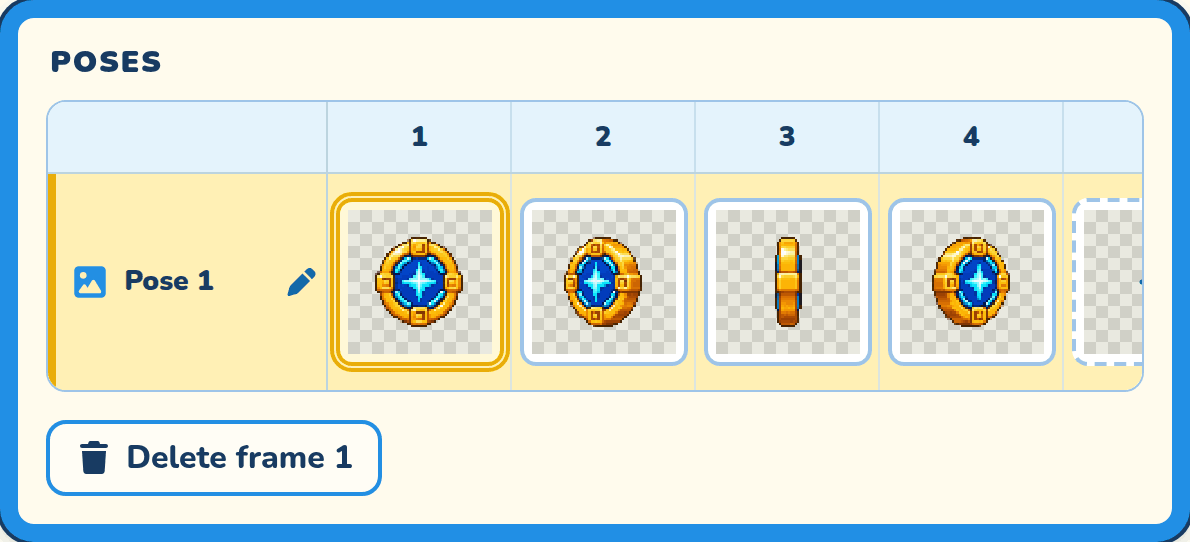
It has four frames. As the coin turns, it gets thinner, then wider again:
| Frame | What it shows |
|---|---|
| 1 | The coin from the front: round |
| 2 | The coin turning: a tall oval |
| 3 | The coin side on: a thin edge |
| 4 | The coin turning back: a tall oval again |
Open your coin
Your coin is in your Lab. If it isn't open in your other tab, open it again:
- Go to your Lab, and press My Addons on the left.
- Press your coin's card.
If Cooper's chat opens and offers to make the rest of your frames, you don't need it. Close it with the round X  .
The Poses box
The Poses box is under your picture. Your coin has one row, Pose 1. The row has one frame: the coin you drew. After it is a box with a +. The frame with the gold border is the one you are drawing on.
Frame 2: a tall oval
- Press the + box at the end of the row. A new frame appears. It is a copy of frame 1, and it opens after a moment.
- Pick up Select
 , drag a box round the whole picture, and press Delete. Frame 2 is empty. Frame 1 still has your coin.
- Pick the dark gold edge color. Tip: it is in Recent, in the color picker.
- Pick up the Circle
 . Drag a tall, thin box: from 18 across and 8 down, to 46 across and 56 down.
- Pick the gold, then Fill
 the inside of the oval.
Frame 3: the edge
- Press the + box again. Frame 3 is a copy of frame 2.
- Clear it with Select and Delete, like before.
- Draw an even thinner oval with the dark gold: from 28 across to 36 across, and fill it with gold.
Frame 4: the oval again
Frame 4 is the same as frame 2. So copy it:
- Click frame 2 in the Poses box.
- Press the + box. The copy goes straight after frame 2. Your thin edge moves along to frame 4.
- Put the edge back in third place. Drag it one place to the left. A gold bar shows where it will go. (Or click it, hold Ctrl and press ←.)
Now your frames go: round, oval, edge, oval.
Play
Press Play  , under the picture. Your coin spins! Press Pause to stop it. You can't draw while it plays.
| If your coin | Try this |
|---|---|
| Jumps around as it spins | The ovals aren't in the middle. Use guides and Select to line them up. |
| Has a frame you don't want | Click it, then press Delete frame, under the Poses box |