


Game Settings
ReadingSettings for your game and levels
Some things are about your whole game, not one level: its name, its hero and how many lives the hero has. They are in Game Settings.
Open Game Settings
Press the Game button  (the gear) in the row under the map. Your changes save by themselves.
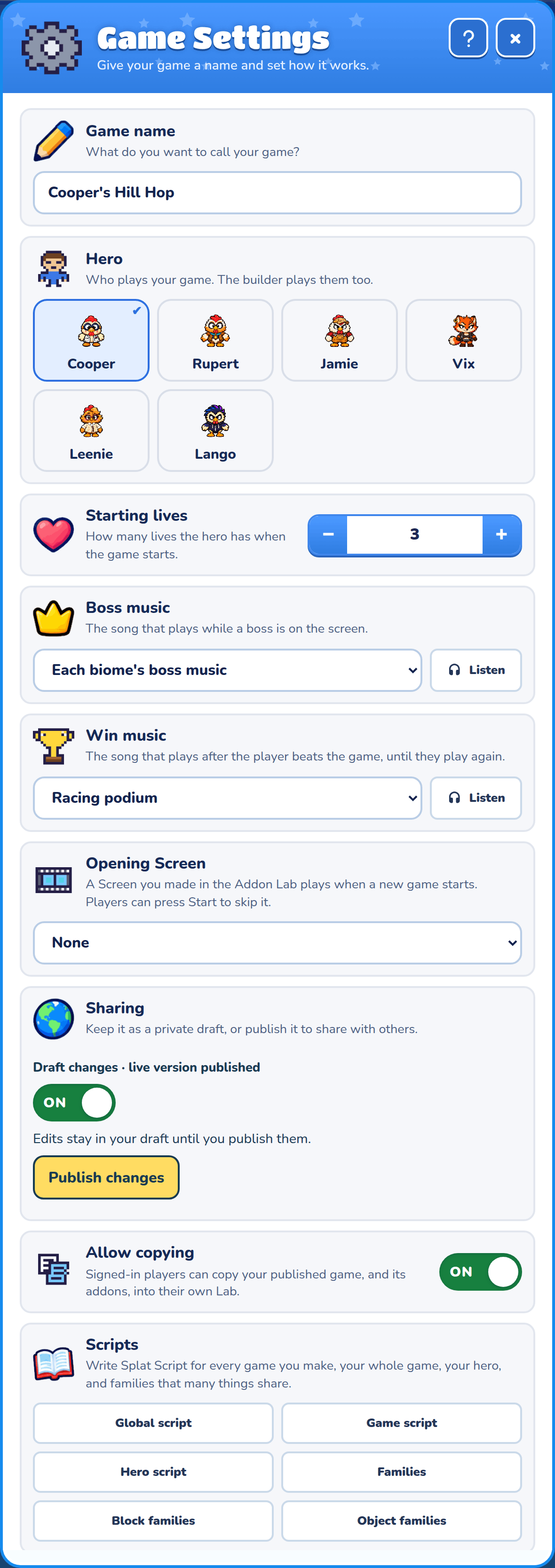
What you can change
| Setting | What it does |
|---|---|
Game name  | What your game is called |
| Hero | Who plays your game. You can pick from the Splat Labs crew, or a hero of your own from the Addon Lab. |
| Starting lives | How many lives the hero has. Press More lives  or Fewer lives  . |
Win music  | The song that plays when someone beats your whole game |
| Sharing | Your game starts private: only you and your family can play it. Turn Sharing on to share it with everyone. Ask a grown-up first. |
Try it
- Press the Game button .
- Change your game's name.
- Press More lives until the hero has 5 lives.
- Pick a different hero.
- Close Game Settings and press Play
 . The box at the top of the map now says × 5, and your new hero is playing.
Scripts
At the bottom of Game Settings is the Game script button  . A script is a set of rules you write for your game, like "when the hero gets 10 coins, open the door". Scripts are written in Splat Script.
Scripts are a big subject, so they have a course of their own. When you have finished this course, try Splat Script: Code Your Own Game.