
Scripting help
Recipes & Tips
Scripts to copy and change, like a character that rolls at the hero and a ghost that fades away, and tips for keeping a script easy to read.
A recipe is a script that does one thing, ready for you to copy and change. A tip is a way of writing a script that makes it easier to read and to fix.
Every script on this page can be tried. Press the play button beside it, then change a number and try it again.
The recipes build on each other, so it helps to read them from the top.
Recipe: seeing what a script does with log
log writes a line in the script's log, so you can see what a script is doing while the game plays. It's the quickest way to find out why a character isn't doing what you expected.
On this page, the log is the box under each script. While the game plays, it takes the place of the problems box. Press Stop and the problems come back.
Writing a line in the log
Write log, then some words in quotes. When the script gets to that line, the words show in the log. Press Play and watch the box under the script.

Each line in the log starts with the game's time and who wrote it, like 0:02 Enemy: I saw the hero. A line written many times in a row shows once, with a count.
In the builder, the log has a drawer of its own. Turn on Script log in Game settings, and the Script log drawer shows under Find a brush. It fills up while you try your game.
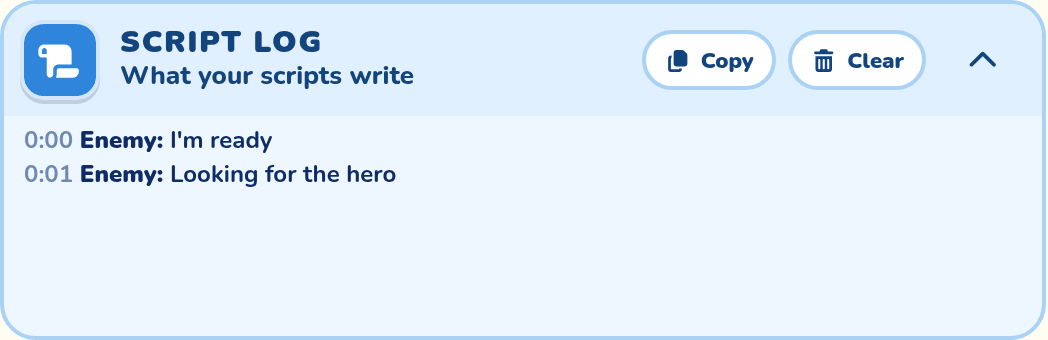
Logging a line of the script
Put log in front of a line of the script, with no quotes. The line still does just what it did before, and the log says what happened.
| You log | It writes | Like |
|---|---|---|
A when or every line | Each time the rule starts, and what set it off | when I see the {Hero}: the hero is 4 blocks away, to my left |
| A step that happens at once | That it was done | face the {Hero}: done |
| A step that takes time | How long it took, once it's done | wait 1 second: done after 1 second |
log works in front of other lines too, like an if or a repeat. The recipes below use it there.
Seeing what a @variable holds
Write log and a @variable on its own, like log @count. The log says what it holds now, like @count is 3.
For a thing, the log says more, so you can find out what the variable points at. It says what kind of thing it is, its map id, and where it is now. A list shows each thing in it.
| The variable holds | The log says |
|---|---|
| A number, words, yes or no | @count is 3 |
| A thing in this level | @boss is {Slime King}: a character, map id enemy_2, at column 12, row 3 |
| A thing that's beaten or hidden | … not out now (beaten or hidden) |
| A thing in another level | … in another level (frozen cave) |
| A thing taken off the map | … taken off the map |
| A list | @ghosts is a list of 2: and then each thing, as above |
Finding out what went wrong
This character should wait 3 seconds and then speak, but it never says a word. The log shows why.
The log says the wait was cut short after 2 seconds, because every 2 seconds took over. A character runs one rule at a time, so when the rule comes round again, it stops its own earlier run. Change wait 3 seconds to wait 1 second, and the character speaks.
Good to know
A log line is safe to leave in a script.
| About | What happens |
|---|---|
| The game | A log line takes no time, and never changes what the character does. |
| Players | They never see the log. |
| In the builder | Turn on Script log in Game settings, and the Script log drawer shows what your scripts write. |
More about the log is in Seeing what a script does.
Recipe: choosing what to do with if
if lets a character choose. It checks something, and the steps under it happen only when the check is true. Use it when a character should do one thing some of the time and another thing the rest of the time.
One choice
This character tells the hero to back off, but only when the hero is close. every 2 seconds makes it check again and again. While the hero is further away, the check isn't true, so the line under the if is skipped.
near means within 3 blocks. Walk up to the character and it speaks. Walk away and it goes quiet.
The log in front of the if writes its answer each time, yes or no, and what it checked. Watch the log as you walk up and away.
The lines between if and end are the ones that depend on the check. They are written further in, so you can see where the if starts and stops.
This or that
Add else, and the character does one thing when the check is true and another when it isn't. This one turns to face the hero, and says which side the hero is on. Columns are counted from the left, so a hero with a smaller column is on the left.
Each choice can have as many steps as you like. Here each one has two: turn to face the hero, then speak. Jump over the character to the other side, and at its next check it turns round and says the other line.
More than two choices
else if adds another check. The checks are tried from the top, and the first one that's true wins. The steps under else happen when none of them were true.
This character says something different for a hero who is very close, quite close, or far away.
The order matters here. A hero 1 block away is within 2 blocks and within 5 blocks too, but only the first check counts, so the character says "Too close!" and nothing else. The log shows this: once a check answers yes, the checks under it aren't tried.
Handy checks
These are some of the things an if can check.
| Check | When it's true |
|---|---|
my health is under 50 | The enemy's health is below 50. over, at least and at most work too. |
the {Hero} is nearthe {Hero} is within 5 blocks | The hero is within 3 blocks, or within the number you write. |
the {Hero} is far | The hero is more than 3 blocks away. |
I see the {Hero} | The hero is in the enemy's view. |
the {Hero}'s column is under my column | The hero is to the left. |
a 1 in 3 chance | One time in three, picked by luck. |
Every check, and how to join two of them, is in Choosing with if and end.
Recipe: doing steps again with repeat
repeat does the same steps again and again. Use it when you find yourself writing the same lines over and over. The script gets shorter, and it's easier to see what the character does.
Before
This character paces left and right three times when it sees the hero, then gives chase. The same two lines are written three times, so you have to count them to know how many times it paces.
After
Here the two lines are written once, inside a repeat. The script does just the same thing. Now the number says how many times it paces, and changing 3 to 5 is all it takes to pace more.
The lines between repeat and end are the ones that repeat. They are written further in, so you can see where the repeat starts and stops. The line after end happens once, when the repeat is done.
The log in front of the repeat writes a line each time round, like time 2 of 3.
Ways to repeat
A repeat can run a set number of times, or keep going until the script stops it.
| Write | What it does |
|---|---|
repeat 3 times | Does the steps 3 times. The most is 20. |
repeat @count times | Does them as many times as the number in a @variable. |
repeatrepeat forever | Keeps going until a stop repeating line, or until another rule takes over. |
stop repeating | Leaves the repeat early, and carries on with the line after end. |
Repeating until something happens
Put stop repeating under an if, and the repeat goes on until the check is true. This character creeps up one block at a time. When the hero is near, it stops creeping and shouts.
Repeating until another rule takes over
A repeat with no number never runs out by itself. In a character's script only one rule runs at a time, so a new rule that starts takes over, and that ends the repeat. This guard paces until it sees the hero.
The next recipe uses a repeat like this one to make a character roll at again and again.
Recipe: rolling at the hero
A spin and a move together make a roll. The spin turns the character's picture round, and the move carries it over the ground, so it looks like a ball rolling at the hero.
The basic roll
This is the smallest roll that works. It has three steps: start spinning, move, stop spinning.
| Line | What it's for |
|---|---|
I am spinning 2 turns a second | Starts the spin. The script goes straight on to the next line while it spins. |
move toward the {Hero} 4 blocks over 1 second | The roll itself. The character keeps spinning all the way. |
I stop spinning quickly | Slows the spin down until the character is upright, on its feet. |
This character rolls only once. when I see the {Hero} happens at the moment the hero comes into view. While the hero stays in view, it doesn't happen again, even if the hero jumps over to the other side. The log shows it: the when line is written there once, and never again.
Rolling again and again
To keep rolling for as long as it sees the hero, the roll needs to happen again and again. Two things make that easy to write.
| Part | What it does |
|---|---|
| A function | learn to roll at gives the three roll steps a name. After that, roll at is a step you can use, and it does all three. |
| A repeat | Does the roll and a rest, over and over, while the hero is in view. |
A second rule, when I lose the {Hero}, takes over when the hero gets away. That ends the repeat and sends the character home.
The wait 1 second is a rest between rolls. It gives the hero time to hit back or get away.
With the roll in a function, the rule under it stays short however much the roll grows. The next two steps only change the function. Functions has more about them.
| If it | Look at |
|---|---|
Never stops rolling, and the log never shows when I lose the {Hero} | Its Notice distances in Object settings. A character with a wide notice hardly ever loses the hero. |
| Should only roll at a hero close by | Write when I see the {Hero} within 5 blocks in place of that rule's first line. |
Rolling the right way
A ball that rolls to the right turns clockwise, and one that rolls to the left turns the other way. I am spinning turns clockwise, and I am spinning left turns the other way.
Here the function uses an if to check which side the hero is on before each roll, and picks the spin to match. Jump over this character, and its next roll comes back at you, turning the other way.
A warning before each roll
A roll is fairer, and more fun to dodge, when the hero can see it coming. Here the function turns the character to the hero and waits a moment before each roll.
with ease-in makes the roll start slowly and speed up, like a real ball. See Advanced: timing.
Making it your own
Change these parts of the roll to make it fit your character.
| To change | Change this | Try |
|---|---|---|
| How far it rolls | The blocks in the move line | 6 blocks for a long roll |
| How fast it rolls | The time in the move line | over 2 seconds for a slow, heavy roll |
| How fast it spins | The turns in the I am spinning line | 3 turns a second, or slowly |
| How it stops | The end of the I stop spinning line | slowly, or over 1 second |
| How big it is | A my size line before the spin | my size is 150%, then my size is normal after the roll |
A character you drew in the Addon Lab can curl up too. Give its sprite a pose of a ball. Then show that pose before the spin, and write my pose is normal after it. See Poses.
Spinning only turns the character's picture. Where it can hit and be hit stays the same. All the spin words are in Spinning, tilting and growing.
Recipe: a ghost that fades in and out
This ghost patrols, fades away, and fades back in. While it's gone it can't hurt the hero, so the hero can walk right through it. It works the same in an Adventure and a Platformer.
The basic fade
my opacity says how solid a character looks. 100 is solid, 50 is half see-through, and 0 can't be seen at all. This ghost starts at 50. Every 3 seconds it fades to nothing, patrols unseen for 2 seconds, then fades back.
| Line | What it's for |
|---|---|
my opacity is 50, at the top | Sets the ghost up before the level starts. |
my opacity is 0 over 0.5 seconds | Fades it out. A fade doesn't hold up the next line. |
patrol for 2 seconds | The time it stays gone. The ghost keeps walking, and the script waits here. |
my opacity is 50 over 0.5 seconds | Fades it back in. |
Harmless while it's gone
A ghost nobody can see still hurts the hero who bumps into it, and that feels unfair. I am harmless stops it hurting, and I am not harmless lets it hurt again.
The fade doesn't hold up the next line, so the ghost is harmless from the moment it starts to fade out. It can hurt again from the moment it starts to fade in.
Not every time
A ghost that vanishes on a beat is easy to learn. Put the fade inside an if with a chance, and the hero can't tell when it will go. Here it vanishes about half the time. The log shows how each try came out.
One number to change
The number 50 is written twice. To make the ghost more solid, you'd have to change both, and it's easy to miss one. A @variable of the ghost's own keeps the number in one place, at the top.
Change 50 to 80 in the first line, and the ghost starts at 80 and fades back to 80. This is handy for a ghost you use in more than one game. See A character's own @variables.
Fading as functions
Fading out is two steps that belong together, and so is fading in. Give each pair a name with learn to. Now the rule at the bottom reads like a plan: fade out, patrol, fade in.
A flicker before it goes
A warning makes the ghost fairer. Here it stops and flickers three times before it vanishes. The flicker is a function with a repeat inside it.
The rule now says every 5 seconds, not 3. The flicker takes a second and a half, and with the 2 seconds gone, the whole thing takes longer than 3 seconds.
Making it your own
Change these parts to make the ghost fit your game.
| To change | Change this | Try |
|---|---|---|
| How solid it looks | The number in the first line | 80 for a ghost that's easy to see |
| How long it's gone | The time in the patrol for line | patrol for 1 to 2 seconds, for a time picked by luck |
| How often it goes | The chance in the if line | a 1 in 4 chance for a ghost that rarely goes |
| Ghosts that don't go together | The time in the every line | every 5 to 8 seconds, so each ghost picks its own time |
| How many flickers | The number in the repeat line | repeat 5 times, with a longer every |
| Good to know | What happens |
|---|---|
Keep it shorter than the every | When the every rule comes round again, it stops its own earlier run. A ghost stopped while it's gone stays gone, and harmless, until the next time. |
| Hitting it | The hero can still hit a harmless ghost, even one that can't be seen. |
| Who can use it | Enemies. Villagers can fade, but I am harmless is for enemies. |
Recipe: a villager who trades
An Adventure villager can't take things from the hero's bag. They offer a deal, and the hero picks Deal or No thanks. This farmer swaps an egg for 2 apples.
The trade
The farmer counts the hero's apples first, so the hero only sees a deal they can take.
Changing it
| To make it | Change |
|---|---|
| Sell for coins | offer "Health egg" to the {Hero} for 10 coins, and count the {Hero}'s coins first. |
| Buy from the hero | offer 15 coins to the {Hero} for 2 "Sack of apples". A villager's coins never run out. |
| Take what's offered | Use when the {Hero} makes an offer instead. See When the hero makes an offer. |
The egg comes out of the farmer's own bag, and the apples go into it. Set the egg in Gives the hero in the farmer's Object settings, or the farmer has nothing to trade.
Tip: leave notes with comments
A line that starts with # is a comment. It's a note for you, or for anyone who reads your script, and the game skips it. A few good comments make a script much easier to come back to later.
Before
This is the ghost from the recipe above. It works, but you have to read every line to find out what it does, and nothing says why the numbers are what they are.
After
Here is the same script with comments. The game does just the same thing. Now the top line says what the character is, and each part says what it's for.
A comment sits on a line of its own. It can go anywhere in the script, and it can be written further in, like the lines around it.
What to write
A good comment tells the reader something the line under it doesn't.
| Where | What to write | Like |
|---|---|---|
| The top of the script | Who the character is and what it does. | # A ghost that fades away now and then. |
| Above a number | What the number means, and what happens if it changes. | # How solid the ghost looks. |
| Above a rule | Why the rule is there, or something to watch out for. | # Keep this longer than the time the ghost is gone. |
| Above a group of steps | What the steps do together. | # Fade back in |
A comment that only says the line again doesn't help. # Patrol above patrol is one of those, so leave it out.
Switching a line off
A comment is also a quick way to try a script without one of its lines. Put # in front of the line, and the game skips it. Take the # away to bring the line back.
Here the ghost never becomes harmless, because both of those lines are switched off. Try it, and see how much harder the ghost is to get past.
Tip: keep a script tidy with functions
A function is a name for some steps. The rolling recipe put its roll in one. When a script gets long, move its steps into functions with clear names. Then each rule is short, and it reads like a plan.
Before
This character rolls at the hero every 4 seconds while it can see them, and rolls twice when it's hit. It works, but the same five lines are written three times. To change the roll, you'd have to change it in three places.
After
Here the roll and the rest are functions. The script does just the same thing, and the two rules at the bottom now say what happens in plain words.
Why it helps
Functions help in three ways.
| What you get | Why |
|---|---|
| Short rules | A rule shows what the character does. How it does it is inside the function. |
| One place to change | Make the roll longer inside the function, and every rule that uses it changes. |
| Fewer mistakes | Steps written once can't be different by accident in one of the copies. |
Ways to stay organized
These habits keep a script with functions easy to find your way around.
| Habit | How |
|---|---|
| Name it for what it does | roll at says more than move 1. The name can be several words. |
| One job for each function | Keep the roll and the rest apart. Then a rule can roll twice and rest once. |
| Functions first, rules last | Put every function at the top of the script, with the when rules under them. |
| Give it a value | For a short roll and a long one, make one function that takes how far to go, not two functions. |
| Say what it's for | Write a comment line that starts with # above a function, to say what it does. |
Here the roll takes a value, so one function does a short roll and a long one:
Everything a function can do is in Functions. A function that many characters need can go in the game script or in a family; see Sharing a function with the whole game and Families.
A boss that keeps popping up
A loop lets the boss attack again even if the hero stays nearby. This example needs no special pose names. Use Object settings to choose its exposed height.
when I start
  stand still
  I burrow

  repeat forever
    repeat until the {Hero} is within 4 blocks
      wait 0.1 seconds
    end

    ambush

    # A short break gives the hero time to move.
    wait 2 seconds
  end

learn to ambush
  I am harmless
  I am invulnerable

  I emerge over 0.5 seconds

  I am harmful
  I am vulnerable

  wait 3 seconds

  I am harmless
  I am invulnerable

  I burrow over 0.5 seconds
end
The Groundhog's own script also waits after the hero leaves: one second of scratching, then one second looking at the camera. Its warning dirt is an in-game effect, so editing the script does not make that one-time effect repeat.