

Addons help
Backgrounds
Paint a sky in three layers that slide past at different speeds as the player runs.
A background is the sky and scenery behind a jumping game. It has three layers over a sky color: Far moves slowest, Middle a little faster, and Near fastest, so the world looks deep as the player runs. Paint on it with the paint tools.
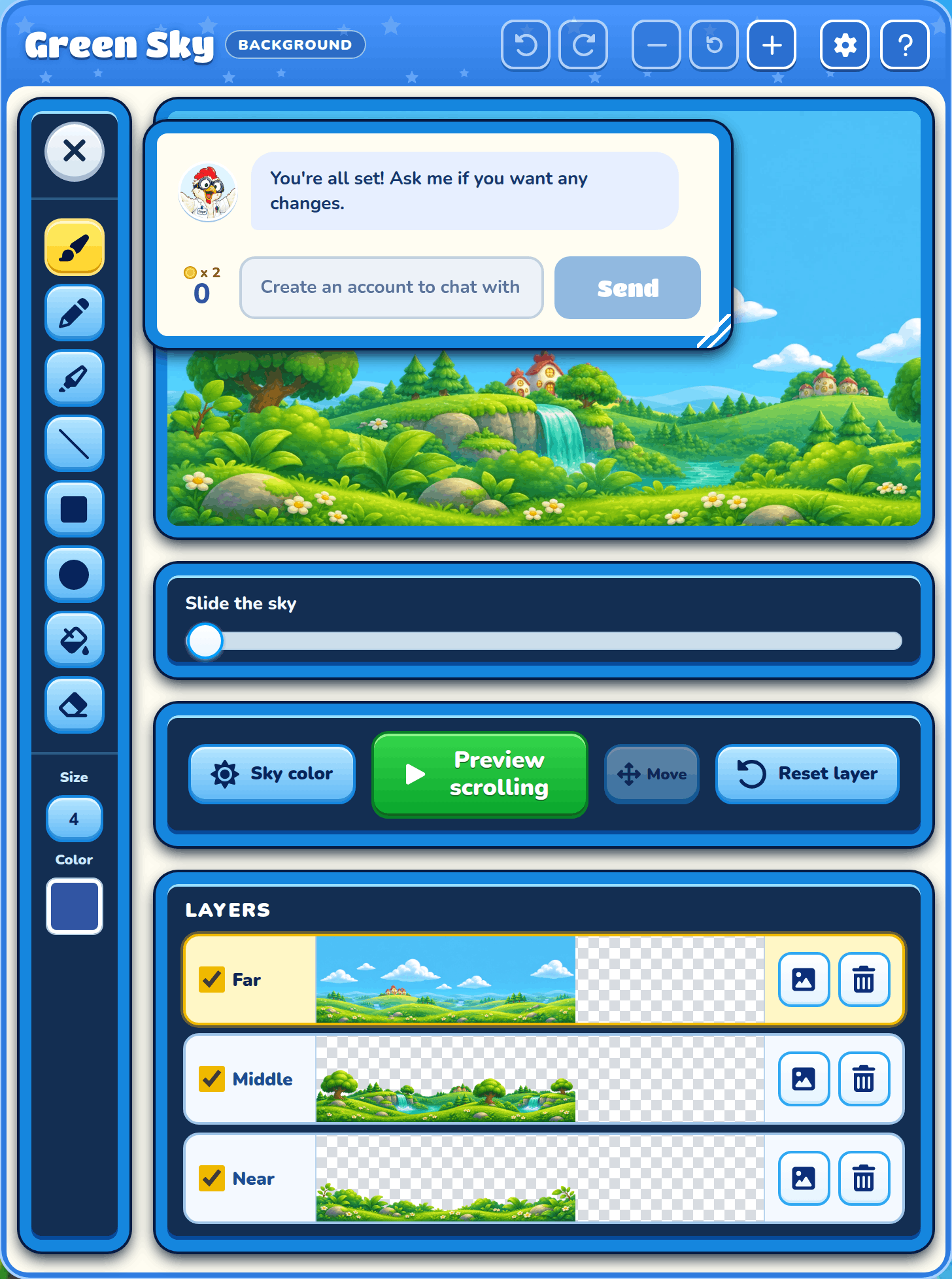
Sky preview
The preview shows your whole sky. Your paint goes on the layer you picked under it. A hidden layer can't be painted.
Slide the sky
Drag the Slide the sky slider to scroll the sky as if the player were running, and watch the layers move.
Preview scrolling
Preview scrolling scrolls the sky by itself, and Pause scrolling stops it.
Reset layer
Reset layer puts the picked layer back the way it was in the sky you copied.
Layers
Each layer has a row with a strip of its picture. Click a row to paint on that layer.
Show layer
Tick or untick a layer's box to show or hide it.
Upload a layer picture
Use your own picture for a layer. PNG, JPEG and WebP pictures work.
Remove a layer picture
Empty that layer, so the layers behind it show through.
Sky color
Sky color opens a small palette of sky colors. The sky color sits behind every layer.
The sky color palette
Tap a color to use it. Drag the palette by its handle to move it out of the way, and press × or Esc to close it.